
Your analytics say people are visiting. Your phone says otherwise. When a website gets visitors but no calls, there’s a cause, and you can usually find it in about 15 minutes with your own phone, Google Search Console and Google Analytics.
The usual advice is a list of fixes: move the phone number up, add reviews, speed the site up. Those fixes are often right. The trouble is applying them before you know which problem you have. A website with the wrong visitors needs different work from a website that turns good visitors away, and both need different work from a business that misses the calls it does get.
This guide walks through the check in order, then matches each finding to the fix that addresses it.
First, decide which of three problems you have
Almost every “visitors but no calls” situation falls into one of three groups:
- The visitors are the wrong people. They’re out of your area, looking for information, job hunting, or arriving on a page that has nothing to do with what you sell.
- The right people arrive and leave. They’re local, they searched for your service, and the page gives them no fast, easy reason to call.
- The calls happen and go nowhere. People try to reach you, but the number doesn’t dial, the form doesn’t deliver, or the call rings out.
The check below is built to sort you into one of these. Do the steps in order, because each one rules something out.
Step 1: Use your own website on your own phone (3 minutes)
Many of your customers will find you on a phone, so start there. Open your home page on your phone, on mobile data rather than office Wi-Fi, and pay attention to what happens before you scroll.
Ask four questions:
- Can you tell what the business does and where it works in the first screen? A slogan, a stock photo and a “Welcome to our website” don’t answer that.
- Is there a phone number you can tap? Tap it. It should open your dialer with the number filled in. If it does nothing, or the number is part of an image, a mobile visitor has to memorize it and type it in.
- How long did you wait before anything useful appeared? If you noticed the wait, a stranger noticed it more.
- How many things are asking for your attention? Several phone numbers, a pop-up, a chat bubble, a cookie banner and a slideshow all compete with the one action you want.
Then open your main service page and repeat the same four questions. Plenty of visitors never see the home page at all.
Step 2: Test every way in (3 minutes)
Next, check that a customer who’s decided to contact you actually can.
- Call the number on the site from a phone that isn’t saved in your contacts. Note whether it connects, how many rings it takes, and what the voicemail says if nobody picks up.
- Submit your own contact form with a real email address. Confirm the inquiry reaches the inbox someone reads, and check the spam folder too. Forms that silently stop delivering are common after a host change, a plugin update or a new email setup.
- Check the phone number matches everywhere. Compare the site, your Google Business Profile and any directory listings. An old number in one place sends a share of callers to a dead line.
If any of these fail, you have a problem 3 business, and that’s the first thing to fix. The rest of the check can wait.
Step 3: See what people searched to find you (4 minutes)
Open Google Search Console and go to the Performance report. Set the date range to the last three months and look at the Queries tab.
You’re looking for one thing: do the searches match what you sell, in the places you sell it?
- Good sign: queries like “roof repair near me”, “emergency plumber [your town]” or your business name.
- Warning sign: queries for job openings, how-to questions you’d never get paid for, products you don’t offer, or towns far outside your area.
Now switch to the Pages tab. If most of your search clicks land on one old blog post about a tangential topic, your traffic number is real but almost none of it was ever likely to call.
If the searches are mostly wrong, you have a problem 1 business. Changing the page design won’t create calls from people who were never going to buy.
Step 4: See what local visitors did when they arrived (5 minutes)
Open Google Analytics 4 and go to Reports, then Engagement, then Landing page. This shows which page each visit started on.
Add a comparison or filter so you’re only looking at visits from organic search. Then open User attributes, then Demographic details, set to City, to confirm those visits come from your service area. Focus on your home page and your main service pages.
What you’re trying to learn is simple: are local people who searched for you landing on the pages that should produce calls?
If yes, and calls are still low, you have a problem 2 business. The right visitors are arriving and the page isn’t converting them.
One caution about GA4. Out of the box it doesn’t report taps on your phone number, because a tel: link isn’t one of the events enhanced measurement collects automatically. Unless someone has set up a phone-click event, “no calls in Analytics” can simply mean “nobody is counting.” That’s worth fixing on its own, so future checks rely on numbers instead of impressions.
Also check where your calls already come from
Before you decide the website is the problem, look at your Google Business Profile. Its Performance view includes a Calls figure, which counts taps on the call button on your profile, according to Google’s Business Profile help.
For many local service businesses, a meaningful share of calls start there, without the caller ever opening the website. That changes how to read your analytics. A website with modest traffic can still matter a great deal, because people check it after finding you on the map, before they decide to call. Treat the profile number as a floor, since people who copy your number and dial it by hand don’t appear in it.
What a problem 2 page looks like, and what changes
Here’s a real example from a South Florida roofing company, with the name and contact details blurred.
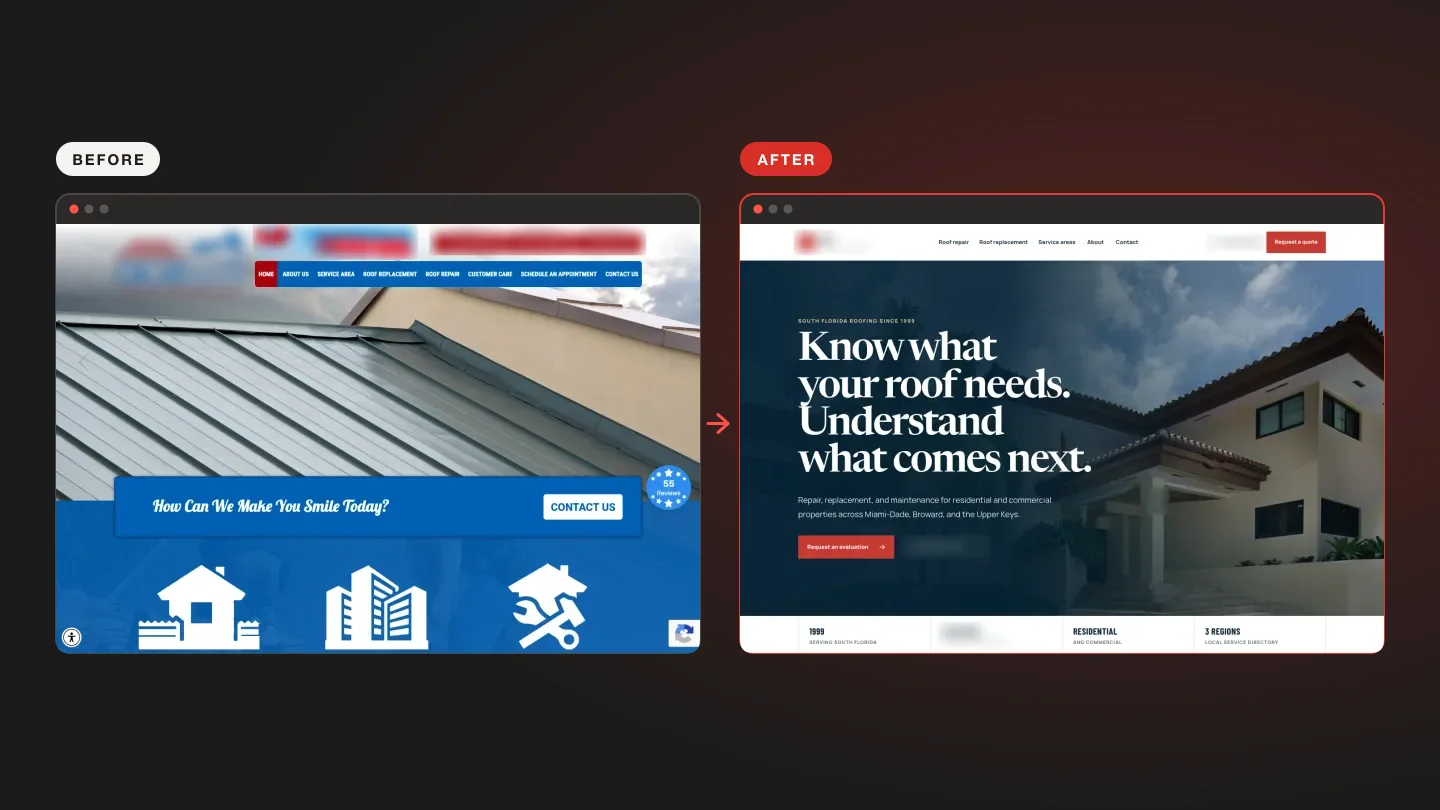
The old first screen had:
- A large photo of a roof, with the first words being a slogan
- Three separate phone buttons for three counties
- Eight menu links in a bright bar
- A “Contact us” banner and a floating review badge competing with all of the above
The rebuilt first screen has:
- A plain headline about repair, replacement and maintenance
- The counties served, named in one sentence
- One quote button and one phone number to call
- Years in business, licensing and coverage set in one row below
The business stayed the same: same services, same service area, same owner. The rebuild changed how quickly a stranger on a phone can answer three questions. Do they do what I need? Do they work where I am? How do I reach them?
That’s the core of fixing a problem 2 page. Most of the information was already on the old site, all of it shown at once and in the wrong order.
How to fix a website that gets visitors but no calls
Once you know which problem you have, the fixes become specific.
If the visitors are the wrong people
- Write or rework service pages around the services you actually sell, in the places you actually work.
- Name your service area plainly on those pages, without padding them with dozens of near-identical town pages. Our guide to service area pages that avoid doorway problems covers how.
- Leave useful informational posts in place, and link from them to the relevant service page so the occasional ready buyer has somewhere to go.
If the right visitors arrive and leave
- Put what you do and where you do it in the first line of the page.
- Use one primary action. A single tappable phone number and one form or quote button beat a row of competing options.
- Bring proof up the page: reviews, licensing, years in business, real photos of your work.
- Remove whatever is slowing the first screen down. Large slideshow images and heavy scripts are the usual causes.
- Make the form short. Name, phone or email, and a sentence about the job is usually enough to start a conversation.
If calls happen and go nowhere
Fix the dialer link, the form delivery or the number mismatch first, because everything else depends on it. Then decide who answers during business hours and what happens after hours. A voicemail that promises a call back by a specific time keeps more callers than a generic greeting. Reply to form inquiries quickly, too. A lead who hears nothing for a day has usually called someone else.
When it’s worth getting help
You can do most of this check yourself, and you should. It costs nothing and tells you where the problem sits.
Outside help makes sense when the check points to a problem 2 page and you aren’t in a position to rebuild it, or when the site is hard to edit and every change means calling a developer. That’s the job our Website Remediation service was built for. We take the site you already have, keep your real content, and reformat it into something a customer can use on the phone in their hand. It’s a fixed $497.
If you’d rather see the difference before deciding anything, request a free homepage preview. We rebuild your home page with your real business on it, and you decide what happens next.
Common questions
How many calls should a small business website get?
There’s no reliable universal number. It depends on your trade, your area, how competitive local search is, and how many people already know your name. The better question is whether calls are rising or falling against your own past results, which is why counting phone taps in GA4 matters.
Will adding more traffic fix a website that doesn’t get calls?
Only if the problem is too few of the right visitors. If local, ready-to-buy visitors are already arriving and not calling, more traffic mostly means more people leaving. Fix the page first, then grow traffic.
Does a mobile-friendly design guarantee more calls?
No. A page can fit a phone screen and still bury the phone number, lead with a slogan, or load slowly. Mobile-friendly is the minimum. Clear, fast and easy to act on is the goal.
Should I use a call tracking number?
It helps if you want to know which source produced each call, such as your website, your Business Profile or an ad. If you set one up, follow your provider’s guidance for your Business Profile and directory listings so your number stays consistent across the web.